Bid System
The Bid System is MythTale's auction house. Instead of selling an item at a fixed price like in the NosBazaar, you put it up for auction and players bid against each other until the time runs out: the highest bidder gets the item, and you get the gold.
 1,000,000
Paid from your bank when the auction is created, and again on every relist. Not refunded.
Of the final price, deducted from the gold you collect. No sale, no tax.
Auctions at the same time. A slot is freed when you collect its gold or item.
A bid in the last 2 minutes resets the timer to 2 minutes.
The Bid System never touches the gold in your inventory. Bids, fees, refunds and sale earnings are all paid from and to your bank account. Deposit gold in the bank before bidding or listing.
How to open it
The auction house is opened by using the Bid System (Permanent) item.
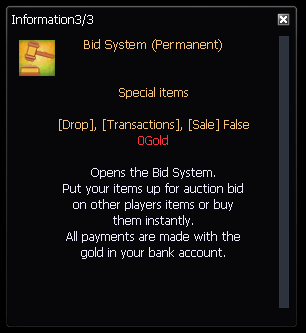
The Bid System cannot be opened:
- on the Act 4 channel;
- while you are trading with another player;
- while the NosBazaar, the warehouse, the partner backpack or the pet basket is open (and the NosBazaar cannot be opened while the Bid System is open).
The window
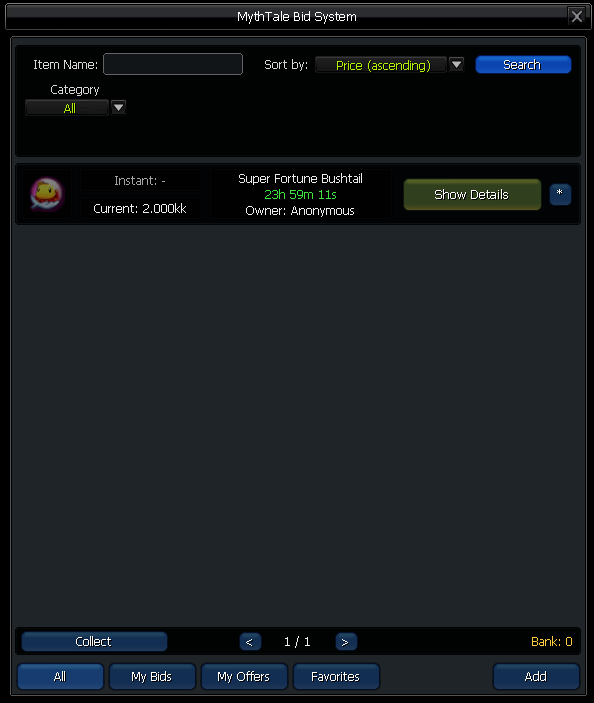
The buttons at the bottom switch between four lists:
Every auction currently running.
Auctions you have bid on, plus the ones you won and have not collected yet.
Your own auctions, until you have collected the gold or the item.
Auctions you starred, up to 50.
Search and filters
Type an item name and press Search, then narrow the list down. The filters change with the category you pick:
Auction details
Each auction in the list shows the item, its instant and current price, the remaining time and the owner. The star button adds it to your Favorites.

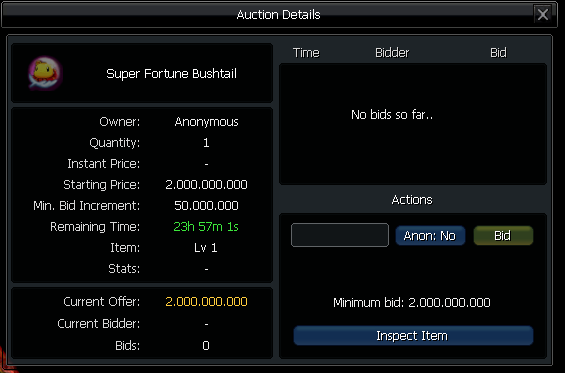
Show Details opens the auction page with the owner, prices, remaining time and the bid history (latest 20 bids). Inspect Item shows the real item with all its stats before you bid.
Selling an item
Open the Add tab, drag the item from your inventory onto the slot and set up the auction. All prices must be multiples of 1,000 gold.
Any amount of the stack you dragged in.
The minimum first bid.
1,000up to 2,000,000,000A buy-now price. Must be higher than the starting price.
How much each new bid must add.
10k100k1kk5kk10kk50kk100kkHow long the auction runs.
12h24h48h72hHides your name from the auction and from the server announcement.
Hides the names of everyone bidding on this auction.
When your auction goes live it is announced to the whole server with the item link and the starting price (at most one announcement per minute).
Bound items and items that cannot be traded or sold.
Managing your auctions
From My Offers you have three actions, each available at a different moment:
Stops the auction and gives the item back. Impossible once someone has bid.
Closes the auction now and sells to the current highest bidder.
Puts it on sale again with the same prices and duration. The listing fee is charged again.
Bidding
Open an auction, type your offer and press Bid. The gold is taken from your bank account immediately and held for as long as you are the highest bidder.
- The first bid must be at least the starting price.
- Every later bid must be at least the current offer + the minimum increment.
- Bids must be multiples of 1,000 gold.
- If you are already the highest bidder you cannot raise your own bid.
- You can switch Anon on to hide your name on that single bid.
- You cannot bid on your own auctions, including auctions created from another of your accounts or from the same computer.
A bid cannot be withdrawn. You only get your gold back when another player outbids you. Every bid and purchase asks for a confirmation first.
Being outbid
As soon as another player outbids you, your gold is refunded to your bank account automatically and you get a message in chat. If you were offline, the refund arrives the next time you log in.
Buy Instantly
If the seller set an instant price, you can press Buy Instantly to pay that price and win the auction on the spot, whatever the current offer is. A normal bid can never reach the instant price - use Buy Instantly instead.
Anti-snipe
A bid placed in the last 2 minutes resets the remaining time to 2 minutes. An auction only ends when nobody has bid for two full minutes, so last-second bids cannot steal an item.
Collecting
Nothing is delivered automatically: when an auction ends, both sides use Collect. The button shows how many things are waiting for you.
Delivered to your inventory. You need a free slot.
Paid into your bank account, tax already deducted.
Withdraw it, or relist it for another round.
Normally refunded automatically the moment you are outbid.
- Gold cannot be collected if it would push your bank over its limit (500,000,000,000 gold): withdraw some gold and collect again.
- Uncollected items and gold stay safe in the auction house until you take them, and you are reminded at every login.
Notifications
The auction house keeps you updated through chat messages, wherever you are:
- a new bid is placed on your auction;
- you have been outbid (with the refund);
- your item was bought instantly or your auction ended, sold or unsold;
- you won an auction;
- a login reminder listing items won, sales to cash in, unsold items and refunds still waiting.
Quick example
A full auction from listing to payout, with the gold moving in and out of each player's bank:
- 1You-
List a weapon: starting price 50,000,000, increment 5,000,000, 24 hours. The listing fee leaves your bank.
1,000,000 - 2Player A-
Bids the starting price. The gold is taken from their bank.
50,000,000 - 3Player B-
Outbids with 55,000,000. Player A is refunded at once.
55,000,000 - 4Timer
Nobody else bids and the auction ends: Player B wins.
- 5Player B
Presses Collect and receives the weapon.
- 6You+
Press Collect: 55,000,000 minus the 2% tax (1,100,000) lands in your bank.
53,900,000