Drop Tracker
The Drop Tracker is a custom widget that measures a farming session for you: turn it on, go farm, and it keeps a running tally of everything you gain - experience, gold, drops and the time spent - so you can see exactly how a spot is paying off.
How it works
- Open the widget from the top-left vertical menu.
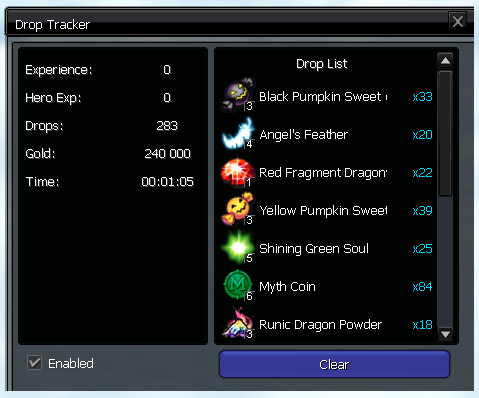
- Tick the enable checkbox to start tracking. A session timer begins and every kill from then on is counted.
- The stats panel updates live with the totals for the session:
- EXP and Hero EXP gained
- Gold gained
- Drops - the total number of items dropped
- Time - how long the session has been running
- Below the stats, a scrollable drop list tallies every item you have picked up - each row shows the item's icon, name and total amount.
- Press Clear to reset the counters and start a fresh session.
tip
Leave it running while you farm a raid, a map or a boss to compare drop rates and gold-per-hour between spots.